
Kilometre Tracking for NDIS and Aged Care: How to Get It Right
How to log, approve, and document kilometres for NDIS travel claims and SCHADS vehicle allowance compliance — and what to look for in software.
Why kilometre tracking matters for NDIS providers
Kilometre tracking is one of those administrative requirements that looks simple until it is not. For NDIS providers, getting it right has direct financial consequences: underdocumented travel claims leave funding on the table, and inaccurate vehicle allowance records create Fair Work exposure. Neither is a theoretical risk.
Under the NDIS Pricing Arrangements, providers can claim two distinct types of travel costs. Provider travel time (the worker travelling to or between participants) is billed at the same support item rate as the support being delivered, subject to time caps (generally up to 30 minutes in MMM 1-3 areas (metropolitan and regional centres) and up to 60 minutes in rural and remote areas MMM 4-5). Check the current NDIS Pricing Arrangements for the applicable limits. The per-kilometre vehicle cost is claimed as a separate non-labour line item, subject to distance limits and the relevant per-km cap. Both types require documented evidence: who drove, where they drove, how far, and in what context. A number in a spreadsheet that nobody can trace back to a specific participant and shift is not documentation. It is a liability.
For aged care providers using the Support at Home program (from 1 November 2025), travel costs are typically managed within the participant's overall package budget rather than claimed per-kilometre against a pricing arrangement. Speak with your provider consultant about the arrangements that apply to your organisation.
Under the SCHADS Award (clause 20.3), workers who use their own vehicle to travel between clients during a shift are entitled to the vehicle allowance at the current per-kilometre rate (check the Fair Work Pay Guide for the operative figure). Payroll teams cannot calculate this accurately without per-trip records. Organisations that estimate or round off are either underpaying workers or overpaying without a basis for the amount.
What good kilometre tracking looks like
The baseline requirement is a record for each trip that captures: the date, the worker, the start and end address, the distance, and the reason for the trip. "Reason for the trip" is not a box-ticking exercise. It maps directly to NDIS claim categories:
- Travel to client covers the worker travelling to reach the participant's home or support location. This is relevant to NDIS provider travel claiming.
- Transporting the client covers trips where the participant is in the worker's vehicle, such as community access activities or medical appointments. These kilometres are generally claimed against the participant's Core: Transport budget, not as provider travel (a separate funding source with different rules).
- Errand/other trip covers trips on behalf of the participant where the client is not in the vehicle, such as shopping or pharmacy runs. Errands without the participant in the vehicle have different claiming rules under both NDIS and SCHADS. Check the participant's plan and your enterprise agreement before claiming.
Different trip types are treated differently for NDIS claiming purposes and may map to different support items depending on the participant's plan and agreement. They may also attract different SCHADS entitlements. Treating all kilometres as the same type is the most common documentation error, and the one most likely to be flagged in an NDIS audit.
Beyond the basic record, the most defensible documentation includes an odometer reading at the time of the trip. Odometer readings are the gold standard in any distance dispute because they cannot be reconstructed retrospectively. Receipts for parking and tolls are also worth capturing when incurred during a shift.
Common mistakes that create problems later
Manual spreadsheets with no approval trail. The worker fills in a kilometre log, the coordinator signs it off in a group chat, and nobody can produce the original record six months later. An auditor asking for evidence of travel claims for a specific participant on a specific date needs a retrievable, dated record. A reconstructed spreadsheet does not meet that bar.
Missing trip type categories. Kilometres recorded without a trip type cannot be correctly attributed to NDIS claim categories or SCHADS entitlements. The fix is to capture trip type at the time of logging, not to try to work it out retrospectively from context.
End-of-fortnight reconstruction. Workers who log all their travel at the end of a pay period are reconstructing from memory. Distances, addresses, and dates become estimates. The most auditable records are captured at the time of the trip, while the worker is still parked.
No coordinator review step. A kilometre log that goes straight from carer to payroll without a coordinator approval creates two problems: it leaves inaccurate records unchecked, and it provides no evidence that the claimed travel was known to and authorised by the organisation. An approval step is both a quality check and a compliance record.
What to look for in software
Kilometre tracking capability varies significantly across NDIS workforce management platforms. When evaluating software, check for:
- In-app logging from the carer's phone. If the system requires carers to log travel on a web portal or separate spreadsheet, most will not do it promptly. The best systems put the logging step on the same device the carer uses for check-in.
- GPS distance calculation. Manual distance entry is error-prone and open to dispute. GPS route calculation from the carer's location gives a defensible distance that does not rely on the worker's estimate.
- Structured trip types. The system should capture Travel to client, Transporting client, and Errand as distinct options, not a free-text notes field.
- A coordinator approval workflow. Logged trips should require coordinator approval before they feed into payroll or claims. Batch approval matters for coordinators processing large teams on a fortnightly cycle.
- Odometer photo capture. Optional but worth having. Organisations that need to defend travel claims under audit will want the odometer evidence stored against the trip record, not in a separate folder that nobody can find.
- Linkage to the shift and participant record. Trip records that exist in isolation from the shift and participant they belong to cannot easily support NDIS claims. The kilometre data needs to trace back to a specific participant, date, and support item.
How Teiro handles kilometre tracking
Teiro includes kilometre tracking built into the carer mobile app. After a visit, the carer taps Log Travel on the shift record. They select the trip type, use GPS to calculate the route distance or enter it manually, and optionally attach an odometer photo and evidence upload. The whole flow takes under 30 seconds.
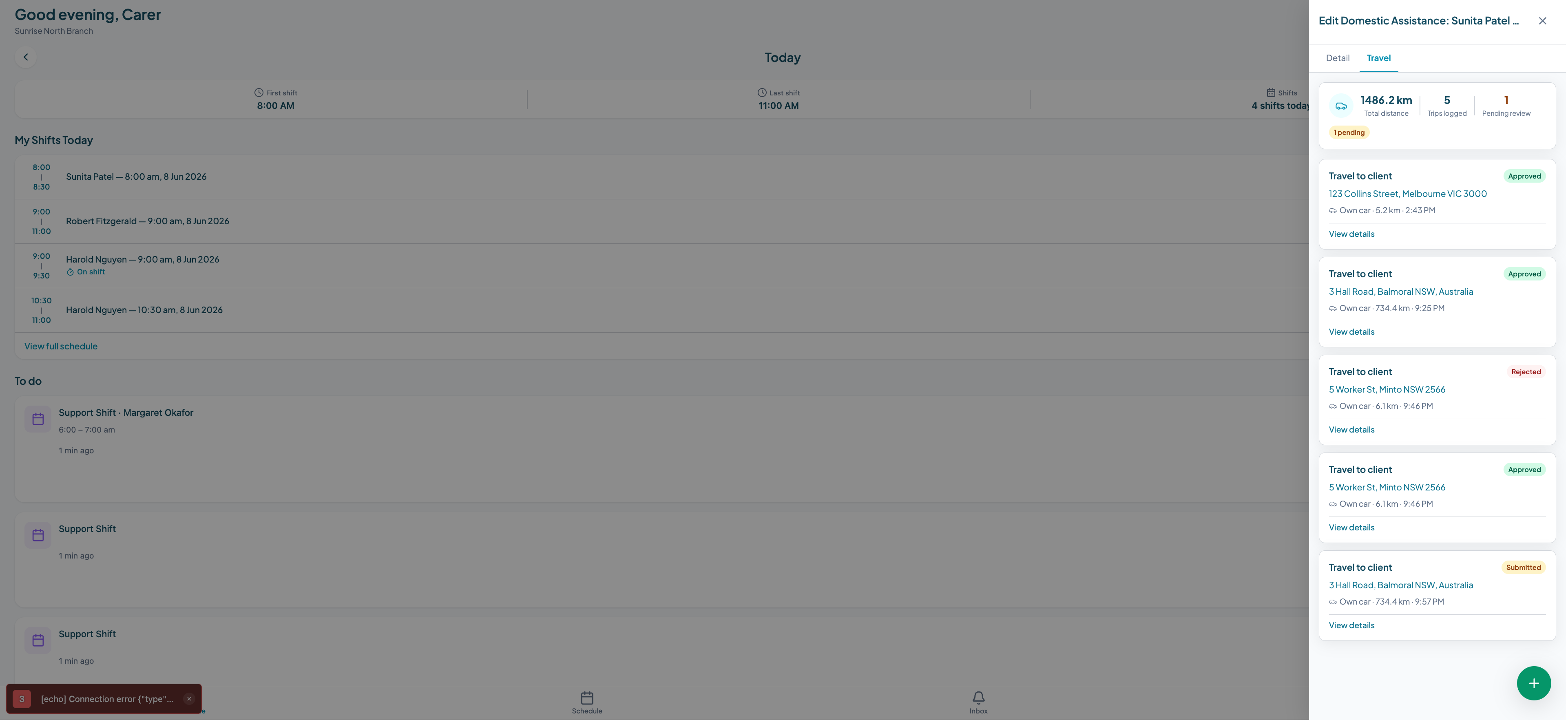
Coordinators see all pending trips in a single approvals view, grouped by worker. Trips can be approved individually or in batch. Every approved trip is stamped with who approved it and when, and is locked from further editing. The total kilometres and approval statuses are visible on the Travel tab of the relevant shift and participant record.
See kilometre tracking in Teiro for screenshots of the full workflow.
Getting started
If your organisation is currently tracking kilometres in spreadsheets or not tracking them at all, the most important first step is to standardise the trip type categories your workers use. Even before you change your software, giving workers three clear categories to record against will improve the quality of your documentation immediately.
The second step is to put the approval step in place. Trip records that have been reviewed and approved by a coordinator carry significantly more weight in an audit than self-reported kilometre logs.
Teiro is free for organisations with five or fewer active users. If you want to see the kilometre logging and approval workflow in the context of your team, book a demo.